
Get more from your new Business Account
- Apply for a Business Account before 30 November for a £200 boost, Xero free for 6 months, plus a £200 Amazon gift card.
- From application to account in just 24 hours.* No account fee for a year, then £10 a month.
Join 1 million businesses banking with Lloyds
Get a Lloyds business bank account. Enjoy the extras.
£200 boost, Xero accounting software and a £200 Amazon gift card when you open a Lloyds Business Account.
Starting a new business
Switching from another bank
Running a business with a turnover of up to £3 million

Choose us and get more than just a bank account
Frequently asked questions
-
Lloyds Business Bank Account fees and charges. Payment type
Charges
Payment type
Monthly account fee
Charges
Free for the first 12 months, then £10 a month.
This introductory offer on the monthly account fee is only available for first-time Lloyds Business Accounts.Payment type
Electronic payments in2
Charges
Included at no extra cost
Payment type
Electronic payments out2
Charges
Included at no extra cost
Payment type
Cash payments (in or out)
Charges
£0.85 for every £100 at an Immediate Deposit Machine / £1.60 for every £100 over the counter
Payment type
Cheques (in or out, any amount)
Charges
£0.85 at an Immediate Deposit Machine or through the app / £1.20 over the counter
Payment type
Credit paid in at branch or ATM
Charges
£0.85
Payment type
Credit paid in at an Immediate Deposit Machine, Automated Deposit Machine, through the app
Charges
No fee
Payment type
BACS
Charges
File submission: £5.50
BACS Item: £0.15 (a set up fee may apply)
Payment type
CHAPS
Charges
£30
Payment type
Sending and receiving money abroad
Charges
Payment type
Balances below £0 (going overdrawn)
Charges
Payment type
Other account services
Charges
No credit interest is payable on this account.
See the full account rates and charges (PDF, 222KB) and product terms and conditions.
Estimate with our calculator how much your business account could cost per month after the first year.
-
To open your business account, you’ll need:
- A copy or photograph of your signature
- A UK driving licence or passport
- The name, date of birth and three-year personal address history (including month and year of moving dates), mobile number and email address for everyone connected to the account.
- Your business name, address, details of your activities and estimated annual turnover
- For limited company accounts, Companies House must be up to date before we can progress an application. Please allow four days from the date of Companies House registration before applying online or over the phone.
-
If you run a small business, there are various benefits to having a business bank account with Lloyds Bank:
- Separate business from personal transactions to make business accounting easier
- Access expert resources and support to grow your business skills
- Manage your accounts using online business banking.
-
If you’ve already started an online application for a small business or start-up account, you can continue or check the status of your application at any time using the log on button in your welcome email, which you’ll get once you’ve provided your personal details.
-
Yes, you can easily switch your current business account to a Lloyds Bank business account using the Current Account Switching Service. Once you’ve given us your details, you can sit back and we’ll manage the rest for you. Find out more about switching bank accounts.
-
Day of request
You tell us you’d like to switch your account to us, and give us the details for the switch. We make contact with your old bank to arrange the switch.
Working day one
We’ll let you know that your old bank has accepted your request, and the switch begins. At this point, we can start transferring your payment arrangements across to your new Lloyds Bank account.
Working day three - five
It’ll take a couple of days to switch over your payment arrangements, and make sure your Lloyds Bank account is ready to go for the switch date.
Working day six
If you’re clearing a debit balance at your old account, you’ll need to make sure there are enough funds in your Lloyds Bank account to cover this transfer.
Working day seven
Congratulations your switch is complete! Your balance is transferred and your old bank account is closed.
After your switch
We will arrange for payments accidentally made to your old account to be automatically redirected to your new account. We will also contact the sender and give them your new account details.
-
We have designed the Current Account Switch Service to let you switch your current account from one bank or building society to another in a simple, reliable and stress-free way. It will only take seven working days. As your new current-account provider we offer the following guarantee.
- The service is free to use and you can choose and agree your switch date with us. We will take care of moving all your payments going out (for example, your direct debits and standing orders) and those coming in (for example, your salary).
- If you have money in your old account, we will transfer it to your new account on your switch date.
- We will arrange for payments accidentally made to your old account to be automatically redirected to your new account. We will also contact the sender and give them your new account details.
- If there are any issues in making the switch, we will contact you before your switch date.
- If anything goes wrong with the switch, as soon as we are told, we will refund any interest (paid or lost) and charges made on either your old or new current accounts as a result of this failure.

-
Apply for a Business Account by answering some questions online. You can use the Current Account Switch Service when we open your new Business Account.
-
The Current Account Switch Service is a fast and simple way to switch your Business Account to us. It’s available for UK current accounts held with participating banks and is typically used by small businesses and charities.
Before using the service, check it's right for you. Your business or charity must:
- have an annual turnover below £6.5 million
- employ fewer than 50 people.
It is only available for Sterling Current Accounts. You’ll also need to check that your existing bank is signed up to the service. Over 50 banks and building societies take part in the Current Account Switch Service - view the full list here.
Got a different question? Check the Current Account Switch Service FAQ page.
-
If you have given permissions to Third Party Providers to make payments on your behalf, or to access your financial data, access to these services won’t be transferred automatically to your new account as part of the Current Account Switch Service.
- Before you close your old account, check whether you have any Third Party Provider permissions set up and if so, who with.
- Once your new account is open you can give your permission to the Third Party Provider to access your new account by providing them with your new account details. You will need to contact the Third Party Provider directly yourself to set this up.
- If you are unsure as to whether your New Bank will support the Third Party Provider permissions on your account, you will need to discuss this ahead of your switch with your New Provider who will be able to advise you of this. Please check your new provider’s terms and conditions for more information about Third Party Providers.
-
It takes around 20 minutes to complete a Lloyds Business Account application. You could go from application to account opening in just 24 hours.
In some cases, we may need extra information to open your business bank account – if this happens, it usually takes 7 days to set up your business current account.
-
- Mobile Banking is available to internet banking customers. We don’t charge you for Internet Banking but your mobile phone provider may charge for some services. Please check with them. Phone signal and functionality may affect services. Terms and conditions apply.
- Google Pay, Google Wallet and Google Play are trademarks of Google LLC.
- Google Pay is not available on all debit cards, credit cards and accounts. The Google Wallet app must be downloaded and is available on Android devices with contactless capability (NFC) and Host Card Emulation (HCE) enabled, running on the Android 9.0 (Pie) operating system or newer.
-
- Mobile Banking is available to Internet Banking customers. We don’t charge you for Internet Banking but your mobile phone provider may charge for some services. Please check with them. Phone signal and functionality may affect services. Terms and conditions apply.
- Apple and the Apple logo are trademarks of Apple Inc., registered in the U.S. and other countries. App Store is a service mark of Apple Inc.
- Apple Pay is not available on all debit cards, credit cards and accounts. Available on iPhone 6/6+ and above, iPad with Touch ID and Apple Watch, with the latest version of iOS required.
Independent service quality survey results
Business current accounts
Published August 2026
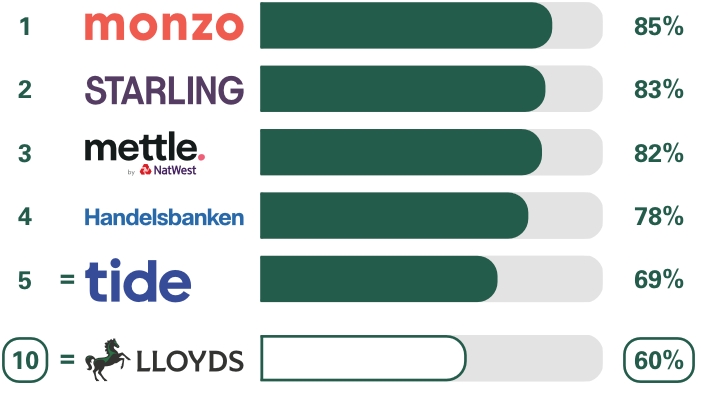
As part of a regulatory requirement, an independent survey was conducted to ask approximately 1,200 customers of each of the 17 largest business current account providers if they would recommend their provider to other small and medium-sized enterprises (SMEs*). The results represent the view of customers who took part in the survey.
Overall service quality
We asked customers how likely they would be to recommend their business current account provider to other SMEs.
*SMEs include businesses, clubs, charities and societies with an annual turnover/income of up to £25m (exclusive of VAT and other turnover-related taxes).
Ranking
The requirement to publish the Financial Conduct Authority Service Quality Information for business current accounts can be found here