
Open a Business Account for start ups
Open a business bank account and get Xero free for 6 months, plus a £200 Amazon gift card.
- From application to account in just 24 hours*.
- First account with us? No account fee for a year then £10 a month.
Get a bank account that works as hard as you
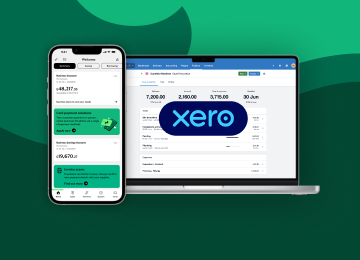
Get Xero free for 6 months
Open a business account and unlock:
- a free 6-month Xero Business Edition subscription of your choice
- a £200 Amazon gift card with most plans, after your first monthly payment (at month 7).
You’ll get an email from Xero after your first payment, with a link to redeem your gift card.
Your approvers are people listed as signatories on your account. You can find this information on your bank mandate. Your bank mandate is the set of instructions given to us when your business account is opened. Contact us on 0345 072 5555 if you have any queries.

Choose us and get more than just a bank account
Xero subscription and gift card offer – Terms and Conditions
-
1. About this offer
If you open a qualifying Lloyds Business Account and meet Xero’s conditions set out below, Xero are offering Lloyds business customers 6 months’ free access to Xero accounting software (the “Subscription Offer”, and the opportunity to receive an Amazon gift card worth £200 (the “Gift Card Offer”)(and together referred to as the “Offer”).
The Offer is available from 14 July 2026 and will end at 23:59 on 31 March 2027.
2. What is a qualifying Lloyds Business Account?
The Offer is provided by Xero if you are:
- A UK business customer who is:
- a new customer opening a Business Account, including where you switch an account from another bank
- an existing customer opening a Business Account for a new business
- opening more than one Business Account for separate new businesses, in which case the Offer will apply to each eligible new account
You can still open the following account types with us, but Xero’s Offer is not available for:
- Charity and Community Accounts
- Secondary Accounts
- Accounts for businesses with turnover over £3m
3. What are Xero’s Offer conditions?
The Offer is brought to you by Xero, not Lloyds. We are simply letting you know about it because Xero wanted to make it available to our customers. If you decide to accept Xero’s Offer, you will be entering into an agreement directly with Xero, and they will ask you to accept their own terms and conditions for the products/services they provide. This is separate from any relationship you have with us, and we are not responsible for the Offer or anything arising from it.
Full details of Xero’s offer are available on their website.
These are the key conditions we think you should know about before you decide to accept Xero’s Offer:
Eligibility Criteria
- You must be a new customer of Xero and also open a qualifying Lloyds Business Account. The Offer is limited to one Xero offer per qualifying Lloyds Business Account.
- You must be purchasing your first subscription on Xero using the link provided to you in the email you will receive when you open a qualifying Business Account. You will not be eligible for this Offer if you have previously trialled or subscribed to Xero. This includes if you have an existing or cancelled account with Xero.
- You will have until 23:59 on 31 March 2027 to purchase your first subscription through Xero.
- The Offer is not available to Accountants or bookkeepers who purchase subscriptions for their clients.
Subscription Offer
- The 100% fee-free discount applies to Xero's price for its Simple, Ignite, Grow, Comprehensive and Ultimate plan subscriptions only. The 100% fee-free only applies to the subscription fee based on the subscription type you have selected and does not apply to additional charges for add-ons, usage, or payment fees. The Offer cannot be used in conjunction with any other Xero plan offer and cannot be exchanged for any other Xero offer.
- At the end of the Subscription Offer period (i.e. after the 6 month fee-free period), your subscription with Xero will be charged at Xero’s standard rates applicable at that time, for the plan you selected and will auto-renew monthly until cancelled. You can cancel your Xero subscription through Xero (Cancel a subscription – Xero Central) but please be aware that under Xero’s current terms, you must give Xero one month’s notice to cancel, but you can do so at any time. Cancelling your Xero subscription does not impact the availability of your Lloyds Business Account(s).
Gift Card Offer
- Xero have separate terms and conditions relating to the Gift Card Offer.
- To be eligible for the gift card, you must connect your Lloyds Business Account to Xero within 7 months of subscribing.
- You are not eligible for the £200 Amazon Gift Card if you select Xero’s Simple plan or are on the Simple Plan when the promotion ends and your first paid monthly payment is collected.
- Eligible customers will receive an email from Xero within approximately 10 days of the first paid monthly payment being collected containing access to a link to redeem the £200 Amazon gift card. There is no cash alternative to the gift card.
- You must redeem the gift card within 30 days from the date of receiving the redemption email. After this time, the promotional link will expire and will not be replaced.
- Xero use a third party to provide the gift card and you may need to enter into an agreement directly with Xero’s third-party provider, and that third party provider may ask you to accept their own terms and conditions for the products/services they provide.
Other important information
- Xero reserves the right to share the information you submit as part of the Offer when subscribing with Xero with Xero’s referral partners for the purposes of promotion attribution, fulfilment, and reconciliation, in accordance with Xero's privacy notice. Further details can be found here.
- Any gift card is provided as a business account promotional incentive. The recipient is responsible for determining and accounting for any tax liability arising from receipt or use of the gift card. Neither Lloyds nor Xero provides tax advice. Recipients should seek their own advice where required.
4. What else you need to know
Your Lloyds Business Account is subject to the account terms and conditions. Fees and charges may apply and all our Business Accounts are subject to our usual eligibility checks and approval criteria when opening your new Business Account.
Once your qualifying Business Account is open, we’ll contact you to explain how to redeem the Xero offer and provide a dedicated link that you must use to access the Offer from Xero.
Xero’s Offer is designed for customers who open the Lloyds Business Account through our online application. If something means your account ends up being opened offline after you started applying online, don't worry - you will still be eligible as long as you meet the offer conditions.
- A UK business customer who is:
Frequently asked questions
-
Find out more about our Business Account fees and charges.
Lloyds Business Bank Account fees and charges. Payment type
Charges
Payment type
Introductory offer
Charges
No monthly account fee for 12 months if it’s your first business account with us
Payment type
Monthly account fee
Charges
£10 after 12 months
Payment type
Electronic payments in2
Charges
Included at no extra cost
Payment type
Electronic payments out2
Charges
Included at no extra cost
Payment type
Cash payments (in or out)
Charges
£0.85 for every £100 at an Immediate Deposit Machine / £1.60 for every £100 over the counter
Payment type
Cheques (in or out, any amount)
Charges
£0.85 at an Immediate Deposit Machine / £1.20 over the counter
Payment type
Credit paid in at branch or ATM
Charges
£0.85
Payment type
Credit paid in at an Immediate Deposit Machine, Automated Deposit Machine, through the app
Charges
No fee
Payment type
BACS
Charges
File submission: £5.50
BACS Item: £0.15 (a set up fee may apply)
Payment type
CHAPS
Charges
£30
Payment type
Sending and receiving money abroad
Charges
Payment type
Balances below £0 (going overdrawn)
Charges
Payment type
Other account services
Charges
No credit interest is payable on this account.
See the full account rates and charges (PDF, 222KB) and product terms and conditions.
Estimate with our calculator how much your business account could cost per month after the first year.
-
To open your business account, you’ll need:
- A copy or photograph of your signature
- A UK driving licence or passport
- The name, date of birth and three-year personal address history (including month and year of moving dates), mobile number and email address for everyone connected to the account.
- Your business name, address, details of your activities and estimated annual turnover
- For limited company accounts, Companies House must be up to date before we can progress an application. Please allow four days from the date of Companies House registration before applying online or over the phone.
-
If you run a small business, there are various benefits to having a business bank account with Lloyds Bank:
- Separate business from personal transactions to make business accounting easier
- Access expert resources and support to grow your business skills
- Manage your accounts using online business banking.
-
If you’ve already started an online application for a small business or start up account, you can continue or check the status of your application at any time using the log on button in your welcome email, which you’ll get once you’ve provided your personal details.
-
Yes, you can easily switch your current business account to a Lloyds Bank business account using the Current Account Switching Service. Once you’ve given us your details, you can sit back and we’ll manage the rest for you. Find out more about switching bank accounts.
-
It takes around 20 minutes to complete a Lloyds Business Account application. You could go from application to account opening in just 24 hours.
In some cases, we may need extra information to open your business bank account – if this happens, it usually takes 7 days to set up your business current account.
-
- Mobile Banking is available to internet banking customers. We don’t charge you for Internet Banking but your mobile phone provider may charge for some services. Please check with them. Phone signal and functionality may affect services. Terms and conditions apply.
- Google Pay, Google Wallet and Google Play are trademarks of Google LLC.
- Google Pay is not available on all debit cards, credit cards and accounts. The Google Wallet app must be downloaded and is available on Android devices with contactless capability (NFC) and Host Card Emulation (HCE) enabled, running on the Android 9.0 (Pie) operating system or newer.
-
- Mobile Banking is available to Internet Banking customers. We don’t charge you for Internet Banking but your mobile phone provider may charge for some services. Please check with them. Phone signal and functionality may affect services. Terms and conditions apply.
- Apple and the Apple logo are trademarks of Apple Inc., registered in the U.S. and other countries. App Store is a service mark of Apple Inc.
- Apple Pay is not available on all debit cards, credit cards and accounts. Available on iPhone 6/6+ and above, iPad with Touch ID and Apple Watch, with the latest version of iOS required.
Independent service quality survey results
Business current accounts
Published February 2026
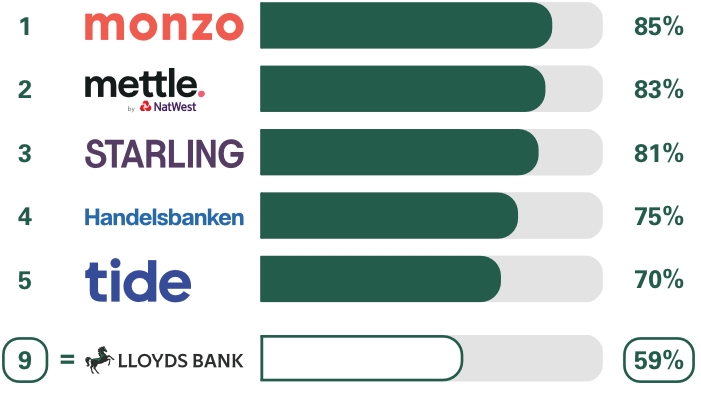
As part of a regulatory requirement, an independent survey was conducted to ask approximately 1,200 customers of each of the 17 largest business current account providers if they would recommend their provider to other small and medium-sized enterprises (SMEs*). The results represent the view of customers who took part in the survey.
Overall service quality
We asked customers how likely they would be to recommend their business current account provider to other SMEs.
*SMEs include businesses, clubs, charities and societies with an annual turnover/income of up to £25m (exclusive of VAT and other turnover-related taxes).
Ranking
The requirement to publish the Financial Conduct Authority Service Quality Information for business current accounts can be found here