Pay in a cheque

You can do this in our app

  • Pay in cheques of up to £10,000 each, or a total of £10,000 a day.
  • Our Mobile Banking app takes a photo of the cheque and reads the details.
  • It saves you a trip to the branch and the money is usually available the next working day.

There are some types of cheque that you can't pay in with the app. The app will let you know if this happens.
A smartphone showing a photo of a cheque.

Steps to take

We'll guide you through it.

(2 min 08 secs)

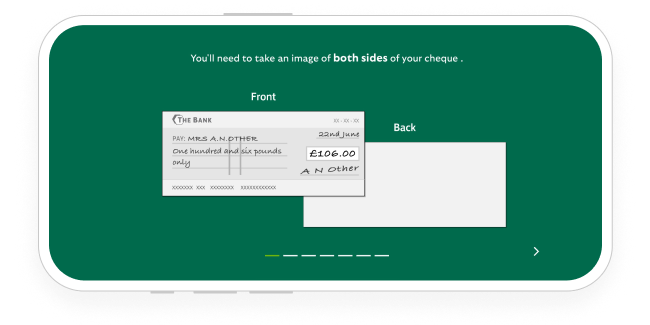
    1. Log in, select the account and then choose the three-dot menu. Then choose 'Deposit cheque'.
    2. Make sure the cheque is less than 6 months old and the recipient name is right, then enter the amount on the cheque.
    3. If you want to, add a reference to remind you who the money is from or what it’s for.
    4. Select 'Front of cheque'. Then, if asked, allow access to your camera.
    5. Lay the cheque on a flat surface with a dark background. Hold the camera level and directly above it. When a green border appears around the cheque, hold still for a moment. The app will then scan the cheque.
    6. Select 'Back of cheque'. Repeat the process, even if it’s blank.
    7. Check the details, then confirm the deposit.
    8. Keep hold of the cheque until the money is available. Then you can destroy it.

Getting started in the app

Mobile banking app

Join our 10 million app users.

  • Simple and secure login.
  • Set up handy notifications.
  • Message us online.

Continue to app

Let’s look at the details

  • You can check the Deposit History tab at any time to see when your money will be available. Here you can view all cheques you've paid in using the app over the last 99 days.

    The Deposit History tab won’t show any cheques you've paid in at a branch or a cash machine.

    If you have a joint account, it also won't include any cheques paid in by the other person using another mobile device. You'll see a total of all paid-in cheques in your account details. They're shown as a pending transaction first, until the money is available.

  • If a cheque in Deposit History says 'Rejected', we were unable to process the payment. Don't try to pay it in again in the app. The reason for rejection will display in your Deposit History, and we'll also write to you to confirm this reason.

    If you posted a cheque to us more than 10 working days ago and haven’t seen the money in your account, contact us.

    We'll require the following details:

    • The date you sent the cheque.
    • Whether you used regular or tracked post - provide the tracking number, if available.
    • The amount and currency - we only accept cheques in British pounds (£).
    • The name(s) on the cheque.
    • Whether you wrote your account number and sort code on the back.
  • The app needs a good sharp image to 'read' the details. Place the cheque flat and in good light against a plain, darker background. Hold your device in the landscape position, steadily over the cheque without tilting. Hold still for a few seconds while the app takes the image – and it should now work.

  • No. For security, cheque images aren't stored in the app. They won't appear in your device's photo library or any cloud service connected with it. Cheque images are only stored securely on bank systems. Similarly, you can't upload cheque images from your device's photo library, or use a photocopy of a cheque.

  • In-app cheque deposits aren't available for travellers' cheques, Bank Giro credits, foreign currencies and other types of non-standard cheques.

    You can pay in cheques written in English, Welsh and Gaelic. The recipient name can be in any language as long as it matches the account name.

  • You can’t pay in a cheque if it’s more than 6 months old, as it may not clear. You should contact the issuer for a replacement.

  • All UK banks now use cheque imaging. This is a quicker and easier way of paying in cheques, such as through the mobile banking app. This is because banks now exchange digital images of cheques instead of physical cheques. It means cheques should clear faster.

    How the cheque imaging process works

    If you pay a cheque in pounds into your account on a Monday, you’ll see it in your account the same day. It counts towards any interest, and you can use the money on Tuesday by 11.59pm at the latest.

    How the Cheque Imaging process works

    Cheque clearing process

    When will the payment affect any interest you get or daily arranged overdraft interest you pay?

    When will the payment be available for you to use?

    When can the cheque be returned unpaid?

    Cheque clearing process

    Cheques paid in using the cheque imaging process

    When will the payment affect any interest you get or daily arranged overdraft interest you pay?

    By 11.59pm on the working day after we receive the cheque.

    When will the payment be available for you to use?

    From 11.59pm on the working day after we receive the cheque, at the latest.

    When can the cheque be returned unpaid?

    Up to 11.59pm on the working day after we receive the cheque.

    A quicker clearing time means money will leave your account sooner than under the 2-4-6 clearing process. Always make sure you have enough money in your account before writing a cheque.