Change your business address
If you're a full access user, you can update your business, registered, mailing and personal addresses within Online for Business and the Business banking app.
Free HMRC-recognised accounting software for Making Tax Digital for Income Tax.


Join the 1 million businesses already banking with us. Apply for a Business Account online in minutes and:
*Any lending decision is based on your financial information and our credit checks. No outcome is guaranteed.
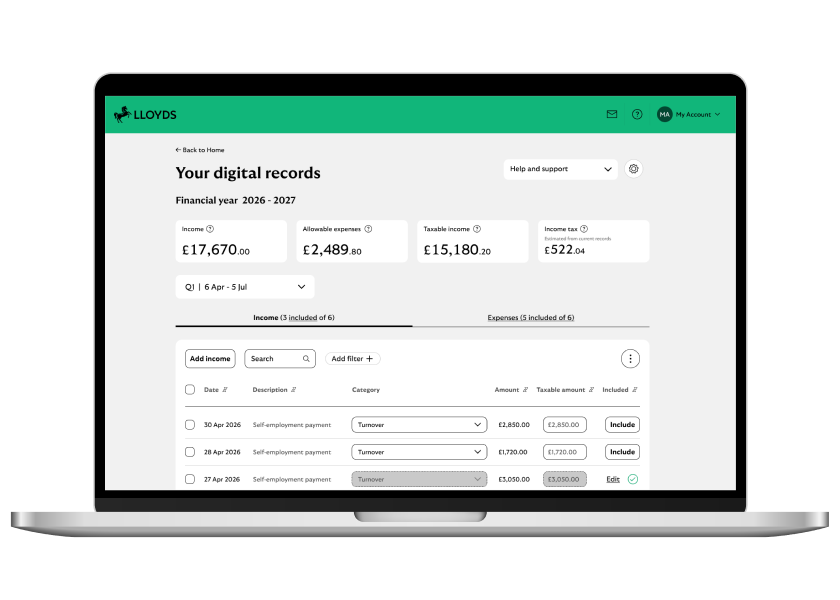
If your business comes under the new HMRC rules, you can access the Making Tax Digital for Income Tax accounting tool using online banking.
When you’ve logged in to online banking, head to the ‘Making Tax Digital’ section.
After you’ve made this selection, follow the on-screen instructions.
James Bews James Bews OsteopathI tried a couple of other MTD software options initially and, in all honesty, got a bit baffled with them. When the Lloyds option came up, it was actually pretty straightforward. Because it was linked to my bank account and everything was in one place, it just seemed blindingly obvious.
If Making Tax Digital for Income Tax doesn’t apply to you yet, you can still sign up early. It will help you to get familiar with how it works, and give you a clearer understanding of your income and expenses.
This can help you prepare if the rules apply to you from April 2027, when the income threshold lowers to £30,000 for the 2025/26 tax year.
If you’re not sure whether the rules apply to you, you can check the requirements with HMRC. Find out if and when you need to use Making Tax Digital for Income Tax - GOV.UK
Bridging software can be used to support you with Making Tax Digital for Income Tax, but it's not mandatory. You don't need to use bridging software to be MTD compliant. If you choose to use bridging software, you'll be able to take digital records from an existing source, like spreadsheets, and digitally submit the required figures to HMRC in the correct format.
If you choose to use the Lloyds MTD software, you won't need to use bridging software. The Making Tax Digital accounting software from Lloyds is HMRC-compatible and HMRC-recognised. It uses transaction data directly from your Lloyds business bank account to help record your income and expenses, so you can meet the new MTD record-keeping and submission requirements.
You can access the Making Tax Digital tool directly through Online Banking.
To register for the Lloyds Making Tax Digital software, the owner of the sole trader business will need to give consent to share account information. This includes selecting which accounts’ transaction data will be shared.
Right now, the tool is only available in Online for Business. We’re working on bringing you an app-based experience soon.
Yes. You only need to sign up for Making Tax Digital once. Connect your account to HMRC to report on multiple businesses.
Initially, you’ll only be able to use the Making Tax Digital for Income Tax tool with your Lloyds Business Account.
We're working on connecting other current accounts. You can still manually add all your business income and expenses and manage your Making Tax Digital for Income Tax requirements in one place.
Yes. To do this, manually add your transactions. Make sure you only select the option to include them once in your quarterly update. Accrual-based accounting records income and expenses at the point they are earned or incurred, rather than when money is received or paid. This means your records reflect what your business has earned and owes, giving you a more complete view of your financial position.
You can submit your quarterly updates directly to HMRC using the Lloyds Making Tax Digital tool in online banking. This means you can manage your records and submit updates all in one place, without needing separate software.
You can choose to send updates using either:
Both options are supported in the Lloyds tool and have the same submission deadlines. You’ll choose your preferred option before submitting your first quarterly update for the tax year. If you’re unsure on which option is right for you, please refer to the HMRC guidance.
No. Business Finance Assistant (BFA) is a separate product and does not support the new Making Tax Digital for Income Tax requirements.
You can sign up for Making Tax Digital for Income Tax software using Online for Business.
There’s no extra cost to use the MTD software. The tool is included with a Lloyds Business Account through online banking, alongside your everyday business banking. Fees and charges may apply to the Business Account itself.
Don’t have a Lloyds Business Account? You can find out more and apply online in minutes. View the Lloyds Business Account
No. Our tool is a record-keeping and submission support tool – it doesn’t provide tax, legal or accounting advice. You remain responsible for your tax affairs and may want to seek professional advice if you need further clarification.
To provide Making Tax Digital for Income Tax, we collect and use personal data about you and your business. This includes your name, business name, and transaction data from the business account(s) you choose to connect.
We use this information to create and maintain digital records of your business income and expenses; and to prepare and submit information required under Making Tax Digital for Income Tax. This is done in line with your instructions and applicable legal and mandatory requirements.
Your personal data is handled in accordance with the Lloyds Bank Business Privacy Notice. Read the full Business Privacy Notice
If you have a concern about HMRC Submissions or Income Tax Self-Assessment obligations, contact HMRC directly at https://www.gov.uk/find-hmrc-contacts.
Lloyds doesn’t provide professional tax or legal advice. If you need help with something specific to you or your business, speak to a qualified specialist. Lloyds accepts no liability for any loss or damage that may result from relying on the information provided.